7.1 權限
完成上傳後,需進行各檔案的權限設定。各檔案、目錄的一般的權限設定為寫在下方的 ( ) 內的數字,請依數字設定各檔案的權限值。權限值或因空間供應商而異,請務必先向空間供應商確認。
(755)
├apeboard.dat (666)
├
├
├boardini.cgi (644)
├
├
├
└
關於權限,若進行說明的話將會很長篇大論的關係,現先說明如何在 Filezilla 上進行設定。
7.2 權限的設定方法
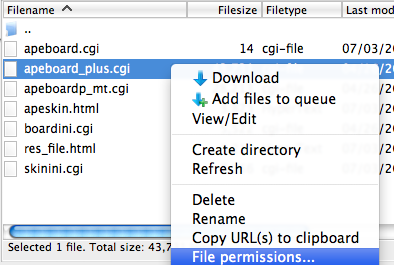
使用Filezilla 的朋友,可右點擊 (right click) 已上傳的檔案,選擇「File Premission」。
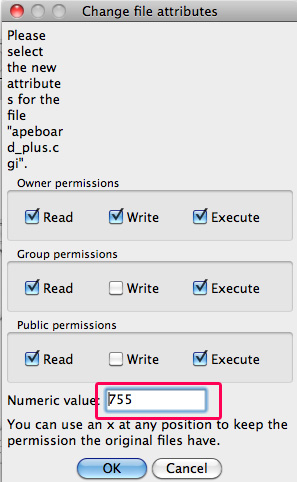
例如要設定為 755 的話,可在 Numeric Value 旁的輸入欄輸入 755。
7.3 權限的意義
755 與 644 這些數字代表着「Read (讀取)」、「Write (寫入)」和「Execute (執行)」三種權限。
若您所使用的FTP 軟件不能直接輸入數字,請依照下表打勾。
| Owner | Group | Public | |||||||
|---|---|---|---|---|---|---|---|---|---|
| Read | Write | Execute | Read | Write | Execute | Read | Write | Execute | |
| 755 |  |
|
|
|
|
|
|
||
| 666 | |
|
|
|
|
|
|||
| 644 | |
|
|
|
|||||
7.4 suExec 環境的場合
若供應商指明「使用 suExec」環境,或有提及「suExec」的話,前面提及的755 和644 可能會不適用。若 apeboard+ 於架設後不能起動的話,請更改為下列權限設定。
├
├
├
├
├
├
├
└
| Owner | Group | Public | |||||||
|---|---|---|---|---|---|---|---|---|---|
| Read | Write | Execute | Read | Write | Execute | Read | Write | Execute | |
| 755 | |
|
|
|
|
|
|
||
| 700 | |
|
|
||||||
| 600 | |
|
|||||||